
MelBet offers a free app for Android & iOS. It mirrors the site’s functionality: there are 30+ sports and eSports, thousands of casino games, regular bonuses, 24/7 support, payments, tournaments, etc. All of it is packed into an optimized interface specifically for small screens. Betting on mobile becomes way more convenient with compact buttons, a collapsible menu, and near-instant access.
Beyond the standard features, the MelBet app provides some extra perks unavailable on the website. These include real-time push notifications, Face ID/Touch ID login, customized interface settings, PIN protection, and more. Application users can also expect exclusive mobile bonuses: free bets, weekly cashback, free spins, and so on.
Mobile Device Requirements for MelBet Apps
The MelBet mobile app doesn’t require an expensive flagship device. To run smoothly, your device must meet only a few basic technical specifications:
|
Parameter |
Android |
iOS |
|
OS Version |
Android 5.0 and up |
iOS 15.0 and up |
|
Free Space |
At least 100 MB |
About 350 – 400 MB |
|
RAM |
1 GB+ |
1 GB+ |
Downloading and Installing the MelBet App for Android
The MelBet app for Android is distributed in an APK format. It works the same way as the files that popular app stores use, except that you download & install it manually. The process is simple even for beginners and takes about 2-3 minutes.
Follow the steps below to download MelBet for Android:
- Visit this page from your phone or tablet.
- Download the MelBet APK file.
- Open the settings and allow installation of unknown files (Security/Safety > Install Apps from External Sources).
- Locate the file in the “Files” or “Downloads” folder.
- Tap on it and choose “Install” in the pop-up window.
To launch the MelBet app, find its icon on the Home screen and click on it once. It will load in a few seconds.
How to Update the MelBet App for Android
Developers regularly release new versions of the MelBet app. To ensure smooth operation and access to all platform features, always update the application. There are two ways to do this on Android:
- Directly in the MelBet app. When a new version is available, the app shows a notification. Click “Update” and wait for a few seconds.
- Manually. You can also find the latest version on this website. Just download the file once again and then choose “Update” in the installation window.
With every update, the mobile app becomes even better. New versions bring important changes: bug fixes, security improvements, faster performance, and so on.
Downloading and Installing the MelBet App for iOS
The MelBet app for iPhone & iPad is installed directly from the App Store. There’s one specific obstacle: Somalia isn’t available as an App Store region, so before installation, change your region in the settings: your name > Media & Purchases > Country/Region > Vietnam (you also can choose Mongolia or Cyprus).
After that, download and install MelBet for iOS:
- Open this site on your iPhone or iPad.
- Click on the iOS link to find MelBet in the App Store.
- Tap “Get” and confirm with Face ID, Touch ID, or your Apple ID password.
When the installation is finished, the “Get” button will change to “Open”. Click on it or find the MelBet app on the Home Screen.
How to Update the MelBet App for iOS
Updates on iOS devices also happen in the App Store. You can either enable automatic updates or install them manually:
- Automatic updates. Go to Settings > Apps > App Store and turn on automatic app updates. Now new versions of MelBet will install automatically in the background.
- Manual updates. Open the App Store, tap on your profile icon, and find MelBet in the list. Then click “Update”.
Your balance, bet history, and other settings are tied to your account, so nothing is lost during the update. Usually, you don’t even need to log in to the profile again and can continue betting right away.
MelBet Apps for PC
The MelBet app isn’t limited to phones and tablets. The bookie also has a dedicated application for PC. It’s downloaded straight to your desktop and opens without a browser, so you can launch the platform in one click.
Plus, there’s the MelBet Access app that gives you current mirrors. This one is especially helpful in Somalia, where online betting sites get blocked often.
Both applications are free of charge and can be installed from the official site. You’ll find them in the footer, in the “Others” section.
MelBet App
The MelBet betting app for computers & laptops is the full version of the desktop site, just packed into a standalone program. To access the platform, you only need to click on the app’s icon one time. It’s a significant plus for those who bet regularly: using the app is more comfortable than searching for the right tab every time.
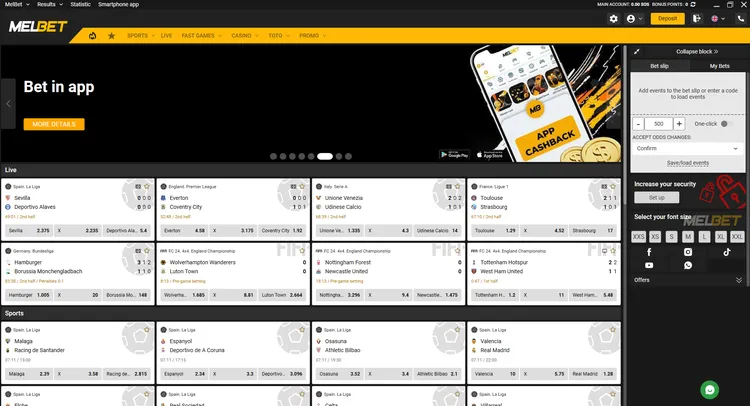
Another advantage is that there are no browser elements: no address bar, extra tabs, extensions, etc. Nothing distracts you from betting or slows down the platform.
MelBet Access App
With the Access app, you always get the current working mirrors of the MelBet site. This means that you can access the platform even when its main domain is restricted.
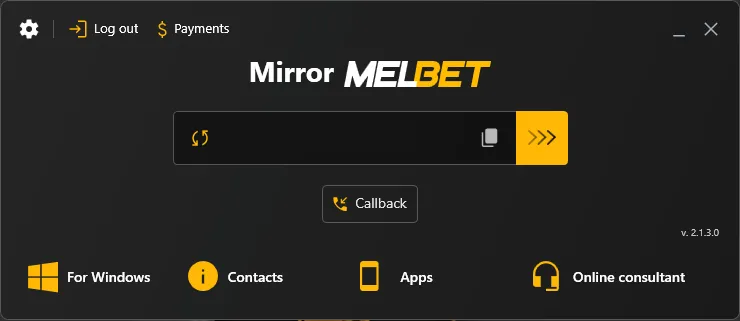
Instead of searching for working links manually and wasting time, you simply open the app and choose a domain. The mirrors are updated regularly.
Bonuses in the MelBet App

Every feature available on the website is also present in the MelBet app, including bonuses. The bookie launches various promos for new & regular bettors: casino cashback, free bets, weekly reloads, VIP gifts for activity, promo codes, massive welcome packages, and so on.
Bet in App
This bonus is made specifically for mobile app users. For betting through the application, you receive 10% cashback of your total stakes, regardless of the results of your bets. Here are the key details of the promotion:
|
Bonus |
10% cashback every week |
|
Time Period |
Applies to bets placed in the MelBet app during one week, from 00:00 on Monday to 23:59 on Sunday, UTC+3 |
|
Minimum Bet to Qualify |
572 SOS |
|
Maximum Bonus |
57,149 SOS |
|
Types of Bets |
Single bets and accumulator bets (2+ selections) on any sporting events |
|
Odds |
1.50 and higher (single bets) / 1.40 and higher for each selection (accumulator bets) |
MelBet Welcome Bonus
For newly registered users, MelBet features two large welcome bonuses: for sports & for online casino. You can choose only one of them: it’s activated automatically after you register and make a deposit.
The sports betting bonus is 100% up to 10,000 SOS. With a promo code BOOKIE130 entered during registration, this offer grows to 15,000 SOS. It applies to the first deposit from 600 SOS.
If you prefer to play casino games, choose the game welcome package instead. It gives new users a 375% bonus up to 1,000,090 SOS + 180 FS across the first three deposits. The minimum top-up is 2,856 SOS.
Other MelBet Bonuses
If you bet in the MelBet app regularly, you receive generous rewards for activity. The list of active promotions is quite wide, with dozens of casino & sports offers plus time-limited events tied to holidays and major sports tournaments.
|
Bonus |
Description |
|
Royal Monday |
100% up to 57,148 SOS on top of the first deposit made on Monday |
|
Ice Season |
Weekly free bets of up to 28,539 SOS for betting on NHL 2026-2027 matches |
|
Crypto Series |
10% cashback up to 57,078 SOS for 5 or more deposits in cryptocurrency |
|
Stay Connected |
Verify your phone after registration and get 50 free spins in the Sweet Bonanza 1000 slot by Pragmatic Play |
MelBet Website for Mobile Devices
If you don’t want to download a separate MelBet app, the mobile version of the site is a full alternative. It opens in all popular browsers (Opera, Safari, Chrome, etc.) and automatically adapts to the screen size of your phone or tablet. The layout is simplified, and the interface elements are easy to reach with a single touch. Buttons, menu items, and other controls are made bigger to avoid mis-taps.
The mobile website suits people with little free storage, those whose devices don’t meet the app requirements, or those who bet only occasionally. To use it, simply visit MelBet Somalia from your mobile browser. You can also add its icon to the home screen for instant access.
FAQ
Can I turn off “Install unknown apps” again after installing MelBet?
This permission is required only to install the MelBet APK file. When the installation is complete, you can disable it in the Android settings. The application will continue to work normally.
Can I add MelBet to my iPhone Home Screen without installing the App Store version?
For iOS, MelBet also offers a progressive web app (PWA) that runs in the Safari browser. To access it quickly, open Safari, click “Share”, and choose “Add to Home Screen”.
Does the MelBet app use less mobile data than the website?
Some interface elements are stored inside the MelBet app, so there’s no need to download them again on each visit. This reduces data usage, especially if you open the platform many times a day. Live dealer tables and streams still consume more data.
Can the MelBet app still help if the main website is unavailable?
The mobile app has built-in tools for bypassing blocks. You can access your account and all the platform’s features even when the main domain is restricted.